

Module · HR
Absences List
Absences List
This section offers a complete and in-depth view of absences recorded in the system, bringing together all the information necessary for effective management. Each absence is precisely documented, including the name of the employee concerned, the category of absence (leave, illness, training, etc.), as well as details such as the total duration and the exact start and end dates.
This detailed table plays an essential role in workforce monitoring, allowing an overall analysis of downtime. It constitutes a valuable tool for anticipating staffing needs, balancing workloads and guaranteeing continuity in the company's activities. With this centralized visualization, managers can take a proactive approach to maintaining a fluid organization and responding effectively to unforeseen events.
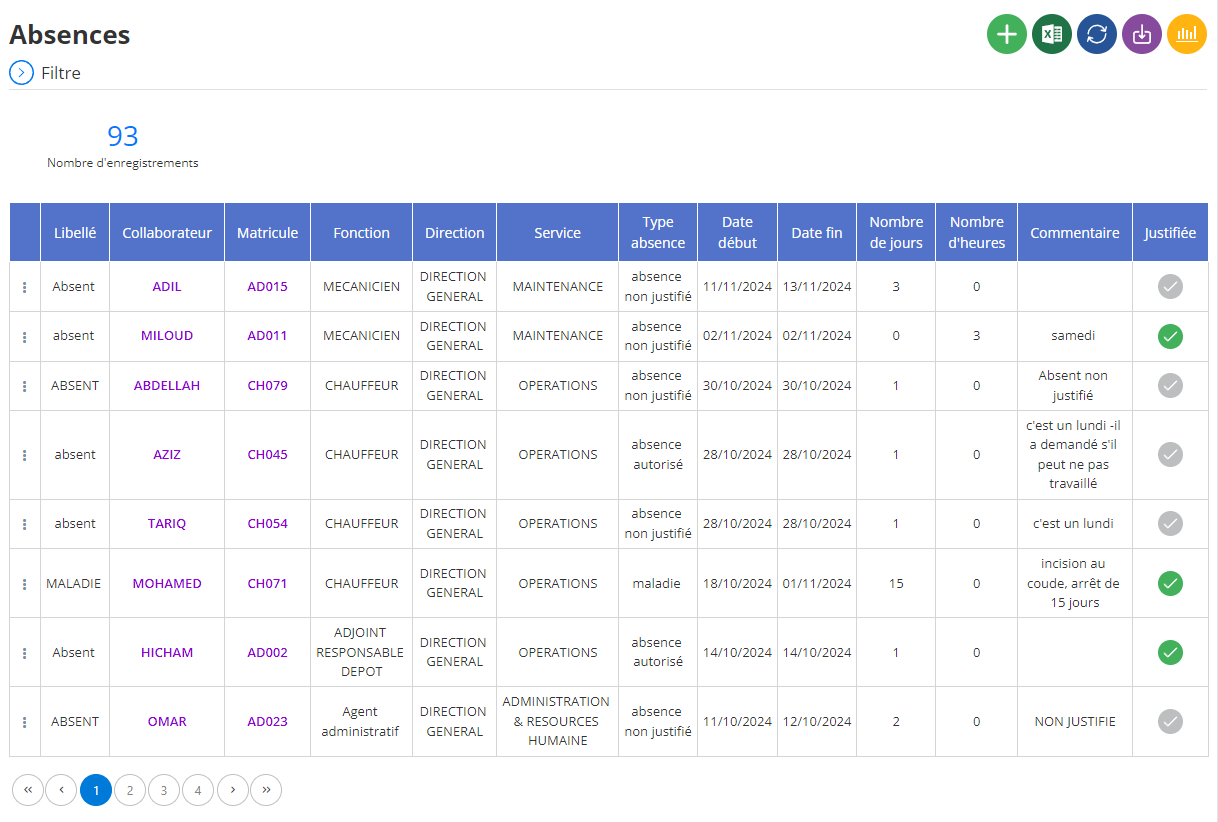
Display of training courses in list
- Wording:Indicates the type of absence (absent, illness, etc.). This field allows you to quickly categorize the different reasons for absence.
- Collaborator:Displays the name of the employee affected by the absence. This makes it possible to quickly identify the individual and find their file.
- Registration number:Correspond au numéro d'identification unique de l'employé dans l'entreprise. Ce champ est utile pour des recherches automatisées et pour croiser les données avec d'autres systèmes.
- Fonction :Indique le poste occupé par l'employé. Cette information permet d'évaluer l'impact de l'absence sur les différentes équipes et de planifier les remplacements si nécessaire.
- Direction :Précise la direction à laquelle appartient l'employé. Cela permet de suivre les absences au niveau de chaque département et d'identifier d'éventuelles tendances.
- Service :Indique le service dans lequel travaille l'employé. Cette information est complémentaire à la direction et permet d'affiner l'analyse des absences au niveau des équipes.
- Type :Détaille davantage le type d'absence (absence non justifiée, maladie, autorisation, etc.). Ce champ permet de différencier les différents motifs d'absence et d'appliquer les règles spécifiques à chacun.
- Date début :Indique la date de début de l'absence. Cette information est essentielle pour calculer la durée totale de l'absence et pour suivre l'évolution des absences au fil du temps.
- End date:Indicates the expected end date of the absence. This makes it possible to estimate the employee's return date and organize the resumption of their activities.
- Number of days:Indicates the total duration of the absence in days. This field allows you to have an overview of the duration of absences and to evaluate their impact on productivity.
- Number of hours:Indicates the total duration of the absence in hours. This information is useful for half-day absences or split absences.
- Comment :Allows you to add additional information about the absence, such as details on the reason or supporting documents.
- Justified:Indicates whether the absence was justified by the employee (for example, by a medical certificate). This field allows you to distinguish authorized absences from unjustified absences.
This absence interface provides a clear and concise overview of absences within the company. It allows managers to track absenteeism, identify trends and take the necessary measures to reduce the impact of absences on the business.