Module · HR
Filtrage Congés
Filtrage Congés
Dans l’interface de gestion des congés, un système de filtrage performant et intuitif a été conçu pour aider les gestionnaires à trier et consulter les demandes de congés en fonction de critères précis. Voici un aperçu des options de filtrage disponibles :
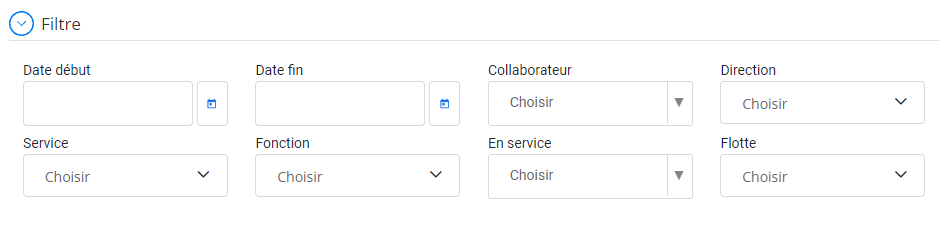
Filtrage avancé des formations
Date début et Date fin: Ces champs permettent de définir une plage de dates pour restreindre les résultats aux congés demandés ou pris durant une période précise.
- Utile pour analyser les absences sur une période spécifique, comme les congés estivaux ou les jours fériés prolongés.
- Facilite la planification des absences futures en fonction des périodes chargées ou critiques pour l’entreprise.
Collaborateur: Ce filtre permet de sélectionner un collaborateur spécifique afin de consulter ses absences enregistrées. Cela aide :
- À visualiser rapidement le solde de congés d’un employé.
- À assurer une gestion équitable des absences au sein des équipes.
Direction et Service: Ces filtres permettent de trier les congés par département ou service, offrant une vue d'ensemble des absences à l'échelle d'une équipe ou d'une division. Ils sont particulièrement utiles pour :
- Évaluer la disponibilité globale des membres d’une direction ou d’un service.
- Planifier les remplacements ou les ajustements en cas de forte absence dans une unité spécifique.
Fonction:Grâce à ce critère, il est possible de filtrer les congés selon les rôles ou fonctions des employés. Cela aide les responsables à :
- Prioriser les congés des postes clés pour éviter toute perturbation opérationnelle.
- Visualiser les absences par catégorie de poste.
En service: Ce filtre permet d’identifier si un collaborateur est actuellement actif ou non. Il est utile pour :
- Restreindre les résultats aux employés encore en poste.
- Exclure les collaborateurs ayant quitté l’entreprise.
Flotte: Pour les entreprises disposant d’une gestion par flotte (véhicules, équipements, etc.), ce filtre permet de visualiser les congés des collaborateurs liés à une flotte spécifique, ce qui peut être utile pour :
- Assurer une couverture optimale des opérations.
- Éviter les périodes d'absence simultanée pour les utilisateurs d'une même flotte.
Ce système de filtrage avancé améliore considérablement l'efficacité de la gestion des absences. Les responsables RH et les gestionnaires peuvent ainsi :
- Identifier les périodes critiques d'absences collectives et ajuster les plannings.
- Analyser les tendances pour optimiser la politique de congés de l’entreprise.
- Assurer une couverture adéquate des équipes pendant les absences.
Avec une interface soignée et des critères de recherche adaptés, ce système garantit une gestion optimisée des congés tout en simplifiant la prise de décision et la planification des ressources.

