

Module · HR
Leave Directory
Leave Directory
In the central section of the leave management interface, requests and absences are displayed in the form of a structured table. Each row represents a specific leave request, while the columns provide key information to facilitate efficient and timely management. Here is an overview of the items featured in this list:
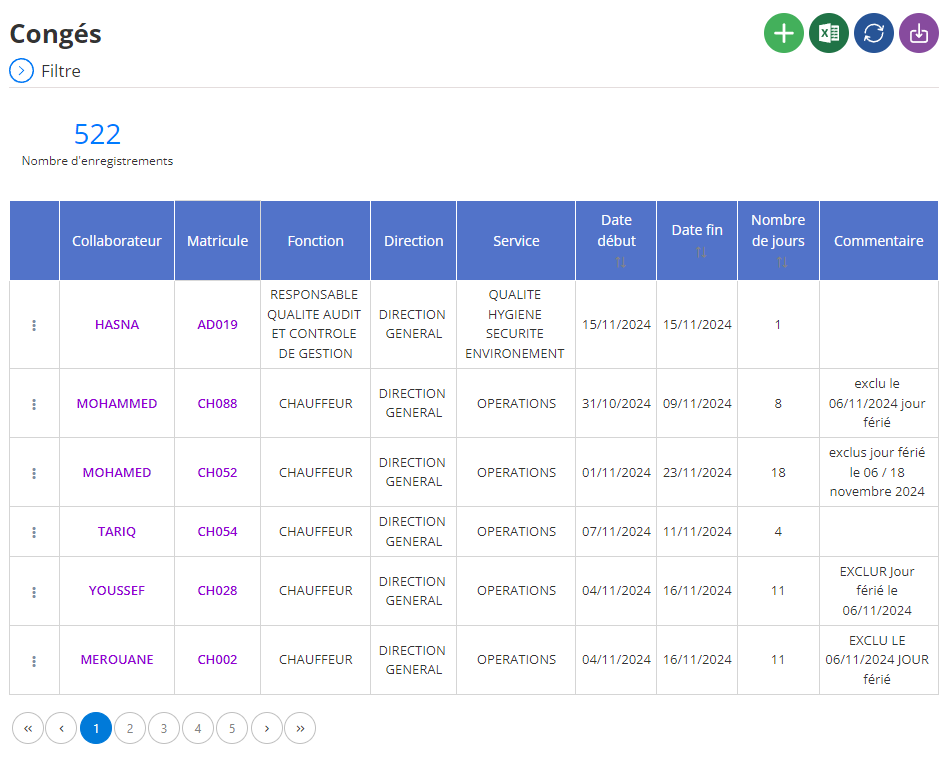
Display of training courses in list
Collaborator: The name of the employee concerned by the leave is displayed, allowing rapid identification. This information is essential for tracking individual absences and managing the leave balance of each employee accurately.
Registration number: Le matricule unique de l’employé est également présenté. Ce numéro facilite l’identification des collaborateurs, en particulier dans les grandes organisations où plusieurs employés peuvent avoir des noms similaires.
Fonction: La fonction ou le poste de l’employé est indiqué, ce qui aide à évaluer l’impact d’une absence sur les activités de l’entreprise et à mieux planifier les remplacements éventuels.
Direction et Service: Les colonnes dédiées à la direction et au service de l’employé permettent de visualiser les absences par département ou équipe, ce qui est crucial pour assurer une continuité opérationnelle au sein des différents niveaux de l’organisation.
Date début et Date fin: Les dates de début et de fin du congé offrent une vue précise sur la période d’absence de l’employé. Ces informations sont indispensables pour organiser les plannings, éviter les chevauchements et gérer les ressources de manière efficace.
Nombre de jours: Le nombre total de jours de congé est affiché pour chaque demande, permettant aux gestionnaires de suivre les cumuls et de vérifier que les absences respectent les quotas alloués.
Commentaire: Cette section fournit des détails supplémentaires ou des justifications concernant le congé, comme les raisons spécifiques (maladie, événements familiaux, etc.). Cela permet de contextualiser les absences et de documenter les demandes pour référence future.
Attachement: Les documents associés à la demande, tels que des justificatifs médicaux ou administratifs, sont disponibles dans cette colonne, garantissant une gestion transparente et complète des informations liées aux congés.
User: The name of the user or manager who processed the request is also recorded. This traceability reinforces transparency and facilitates the audit of actions related to leave management.
With this detailed overview, managers can view and manage leave efficiently and proactively. The table provides a clear overview of absences within the organization, simplifying resource planning and quota tracking. This system guarantees smooth and structured management of leave, while ensuring that the needs of employees and the company are balanced.