Module · HR
Export Rest
Export Rest
Exporting data relating to days off allows users to create a file containing all the information related to days off taken by employees in the system. This file, generally in CSV or Excel format, constitutes a valuable tool for managing absences and monitoring working hours. It can be shared with various stakeholders in the company, such as human resources managers, managers, or auditors, thus facilitating optimal management of leave and rigorous monitoring of absences.
Thanks to this export functionality, it becomes possible to analyze trends related to rest days, detect periods of high demand, or evaluate the distribution of leave within teams. This analysis can support human resources planning, by anticipating replacement needs or adjusting schedules to guarantee business continuity.
By allowing smooth and rapid data extraction, the export of rest days reinforces the transparency of absence management processes and ensures better visibility of rest times within the company. It also simplifies internal or external audits, providing a detailed overview of leave days taken and associated comments.
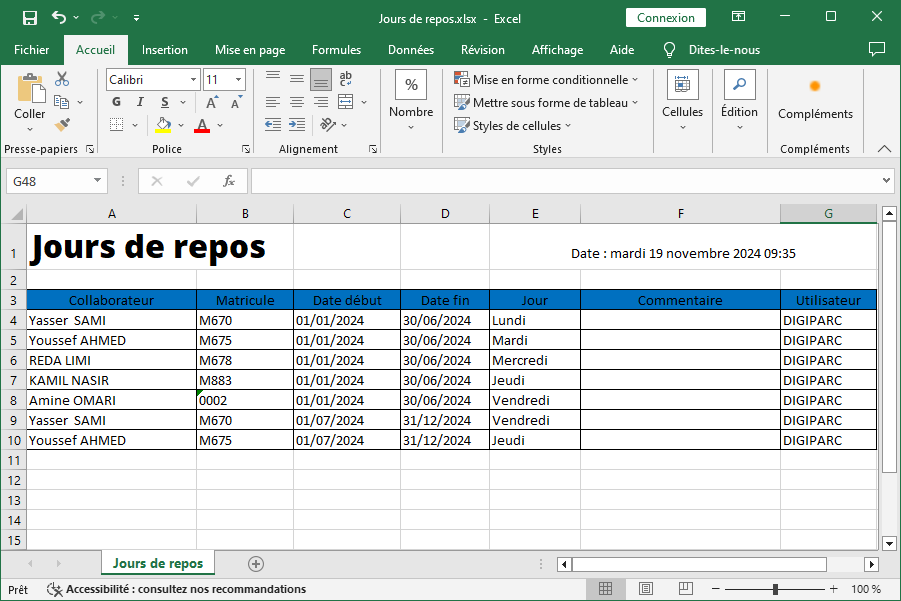
The exported information includes
- Collaborator: This column displays the name of the employee who took the day off, allowing absences to be individually monitored and schedules to be better managed.
- Registration number: The employee number is also included, providing a unique reference for each employee and facilitating rapid identification of data relating to an individual.
- Start Date: This column specifies the start date of the day of rest, making it possible to locate absences in the calendar and to follow the leave history.
- End Date: The end date of the day of rest is indicated to give a complete overview of the period concerned.
- day: Cette catégorie indique le type ou la nature du jour de repos (par exemple, congé payé, RTT, jour férié), permettant de distinguer les différents types d'absences.
- Commentaire: Des informations supplémentaires ou des précisions sur le jour de repos peuvent être inscrites ici, offrant un contexte ou une explication si nécessaire (par exemple, absence pour raison médicale, événement personnel, etc.).
- Utilisateur: Cette colonne indique l'utilisateur ayant enregistré ou validé la demande de jour de repos, assurant la traçabilité des actions dans le système.
This detailed export of rest days allows precise and flexible management of absences. It facilitates the analysis of leave habits within the company and helps human resources managers to optimize schedules, ensure adequate coverage of functions and guarantee management in compliance with internal policies and regulations. With this information, it is possible to identify critical periods, adjust resources accordingly and maintain a balanced and productive work environment.

