Exporting training data allows users to create a file containing all the training information available in the system, such as program details, employees trained, and assessment results. This file, usually in common formats such as CSV or Excel, is a valuable tool for training management and analysis. It can be shared with various stakeholders, such as HR managers, external partners or auditors, facilitating smooth communication and informed decision-making.
This export capacity also makes it possible to carry out in-depth analyzes of training performance, by cross-referencing data such as employee evaluations, participation rates, or even the impact on productivity. These analyzes can support strategic planning for future training, identifying areas where improvements are needed or highlighting the most effective training.
By allowing easy and rapid extraction of data, the export of training reinforces the transparency of talent management processes and ensures better visibility on the evolution of skills within the company. This mechanism also simplifies internal or external audits, by offering a complete and detailed overview of the training provided and the results obtained.
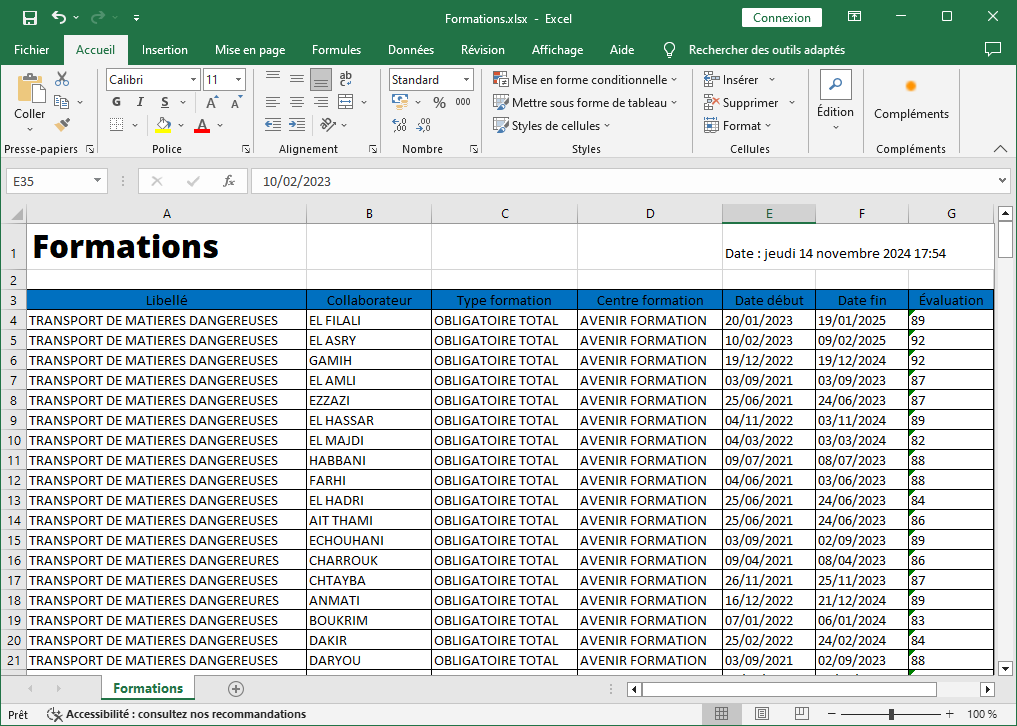
-
Wording: This is the name or title of the training, allowing each program to be quickly identified and differentiated from other training offered.
-
Collaborator: This column displays the name of the employee who completed the training, which makes it possible to follow the skills development process for each employee individually.
-
Type of Training: This category specifies the type of training undertaken, whether it is technical training, leadership training, or any other type of development program. This makes it possible to classify and filter training courses according to their nature.
-
Training Center: The name of the training center or establishment which provided the training is specified here, which facilitates the monitoring of external partners and the evaluation of their performance.
-
Start Date: This column indicates the start date of the training, allowing you to locate the sessions in a calendar and to follow the progress of the training over time.
-
End Date: The end date of the training is also included, in order to have a clear vision of the duration of the training programs followed by employees.
-
Assessment: This column contains the overall evaluation given by the training participants, making it possible to measure employee satisfaction and the effectiveness of the content provided.
-
Center Evaluation: It represents the evaluation of the training center, providing feedback on the quality of teaching and services offered by external providers.
This organized export of training data facilitates decision-making and allows rigorous monitoring of employee skills development. It helps analyze training performance, identify areas for improvement and adjust future programs based on feedback and identified needs. With this detailed view, HR managers can optimize their training strategy, ensure alignment with business goals, and ensure employees receive learning opportunities tailored to their needs.

