Module · HR
Liste Repos
Liste Repos
The interface dedicated tolist of rest daysconstitutes an essential tool for monitoring and managing absences within the organization. This functionality offers a global and detailed view of the rest days allocated to each employee, allowing managers to ensure smooth and organized management of team schedules.
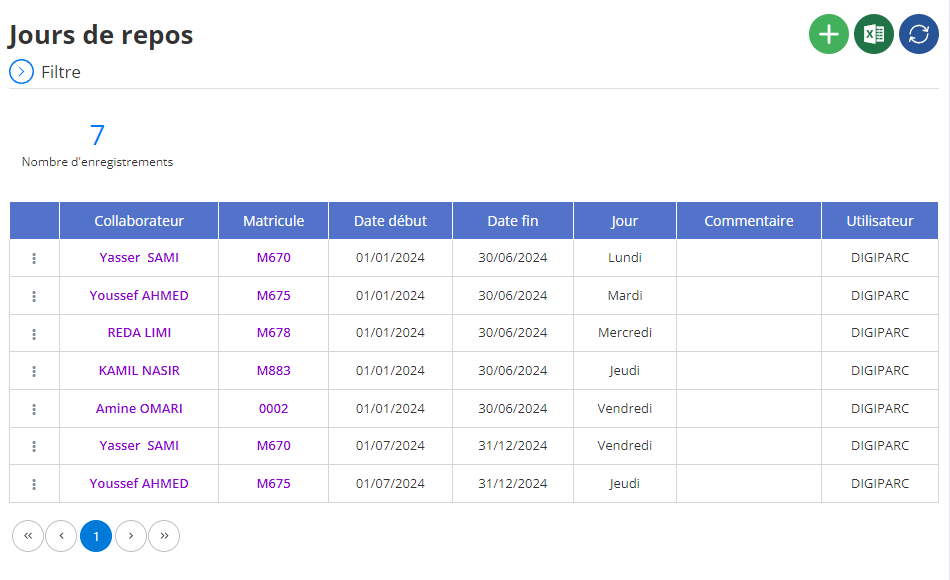
Display of rest days in list
In the central section of the interface, rest days are presented in an organized table, where each row corresponds to a recorded rest day and each column contains essential information for effective management. Here is a detailed overview of the items displayed in this list:
- Collaborator:This column displays the full name of the employee affected by the day of rest. It allows rapid identification and guarantees precise monitoring of absences within teams. With this information, managers can easily view the rest periods granted to each employee.
- Registration number:The unique number of each employee is indicated here, providing a standardized and reliable identification method. This field is particularly useful for large organizations where multiple employees may share a single name, avoiding confusion when processing data.
- Start date:This column specifies the start date of the rest period. It constitutes a key element for planning, because it allows you to track the exact periods of absence and anticipate the impact on the organization of teams.
- End date:La date de fin du jour de repos est indiquée ici, complétant l’information sur la durée de l’absence. Avec cette donnée, les responsables peuvent mieux planifier les ressources nécessaires pour maintenir une continuité opérationnelle durant les périodes critiques.
- Jour:Ce champ spécifie le type de jour de repos accordé (e.g., repos hebdomadaire, jour compensatoire, etc.). Il apporte des précisions importantes qui permettent d'identifier rapidement la nature des absences et de garantir une répartition équitable entre les collaborateurs.
- Commentaire:Les commentaires éventuels associés à chaque jour de repos sont indiqués dans cette colonne. Ces notes offrent un contexte supplémentaire, par exemple des explications sur les raisons spécifiques du repos ou des remarques ajoutées par le gestionnaire. Elles constituent un excellent outil pour conserver un historique complet et transparent.
- Utilisateur:This column identifies the user who saved or modified the rest day information in the system. This allows monitoring of actions carried out within the framework of absence management and guarantees clear traceability for all operations carried out.
With this clear and functional display, organizations can not only optimize their absence management processes, but also promote a fair and well-structured work environment. This table becomes an essential asset to guarantee continuous productivity while respecting the rights of employees to well-deserved rest.

