

Module · HR
Importation Formations
Importation Formations
L'importation de formations en masse offre aux utilisateurs une méthode efficace pour ajouter plusieurs formations à la fois dans le système, en utilisant un fichier préformaté. Cette option est particulièrement avantageuse pour les entreprises ou les établissements qui gèrent un grand nombre de formations et qui souhaitent les intégrer rapidement et sans erreurs.
En permettant de télécharger un fichier contenant toutes les informations nécessaires sur chaque formation, cette fonctionnalité simplifie considérablement le processus d’ajout. Elle permet de réduire le temps consacré à l’entrée manuelle de données et d’assurer une mise à jour rapide du catalogue de formations disponibles. Ainsi, les gestionnaires peuvent se concentrer sur des tâches à plus forte valeur ajoutée, tout en garantissant que l’offre de formation reste constamment actualisée et complète.
Cette méthode d'importation est simple à utiliser et permet de s'assurer que toutes les formations sont ajoutées de manière cohérente et selon les normes du système. Elle favorise également une gestion optimisée de l’ensemble des programmes de formation, facilitant ainsi leur suivi et leur mise à jour régulière.
Étape 1 : Télécharger et préparer le fichier modèle
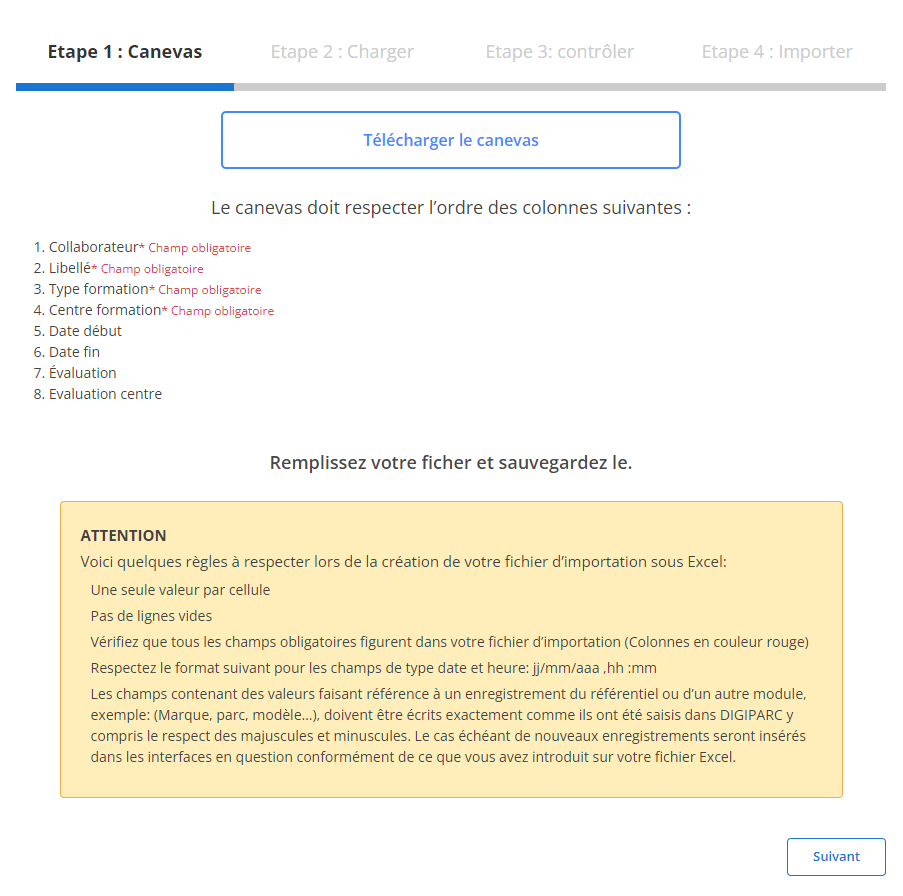
Avant de commencer l'importation, vous devez d'abord télécharger un fichier modèle conçu spécifiquement pour faciliter cette tâche. Ce fichier contient des colonnes prédéfinies qui doivent être respectées pour assurer une importation fluide et sans erreur. Voici comment préparer ce fichier :
-
Téléchargez le modèle: Le fichier modèle est facilement accessible via l'interface. Il comporte des colonnes indispensables à l’importation, et chaque colonne doit être remplie dans un ordre précis.
-
Respectez l'ordre des colonnes: Chaque colonne du fichier correspond à une donnée spécifique et certains champs sont obligatoires. Par exemple :
Il est essentiel de remplir ces champs pour chaque ligne, car un champ manquant ou mal renseigné pourrait entraîner une erreur dans l'importation.
- Collaborateur(obligatoire)
- Libellé(obligatoire)
- Type de Formation(obligatoire)
- Centre de Formation(obligatoire)
-
Préparez votre fichier:
- Veillez à ce qu'il n'y ait qu'une seule valeur par cellule.
- Évitez les lignes vides au milieu du fichier.
- Assurez-vous que les dates (par exemple, date de début et de fin) respectent le format attendu (jj/mm/aaaa).
Étape 2 : Charger le fichier de formations
Une fois le fichier correctement préparé, vous pouvez passer à l'étape suivante : le chargement du fichier dans le système.
-
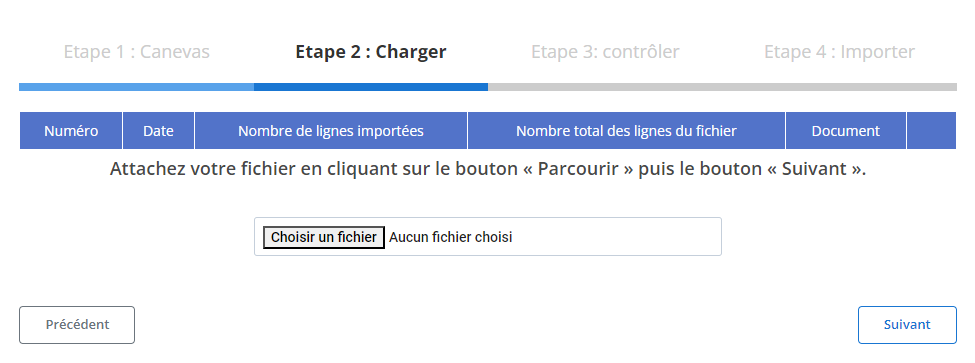
Sélectionnez le fichier: Cliquez sur le bouton "Parcourir" pour localiser le fichier modèle sur votre ordinateur, puis sélectionnez-le.
-
Lancez le chargement: Une fois le fichier sélectionné, cliquez sur le bouton "Suivant" pour démarrer le processus de chargement des données. Le système analysera le fichier et préparera les informations pour une vérification finale.
-
Récapitulatif des données: Un récapitulatif s'affiche à l'écran, vous montrant le nombre total de lignes du fichier ainsi que le nombre de lignes prêtes pour l'importation. Ce récapitulatif vous permet de faire une première vérification du contenu avant de procéder à l'étape suivante.
Étape 3 : Vérification des données importées
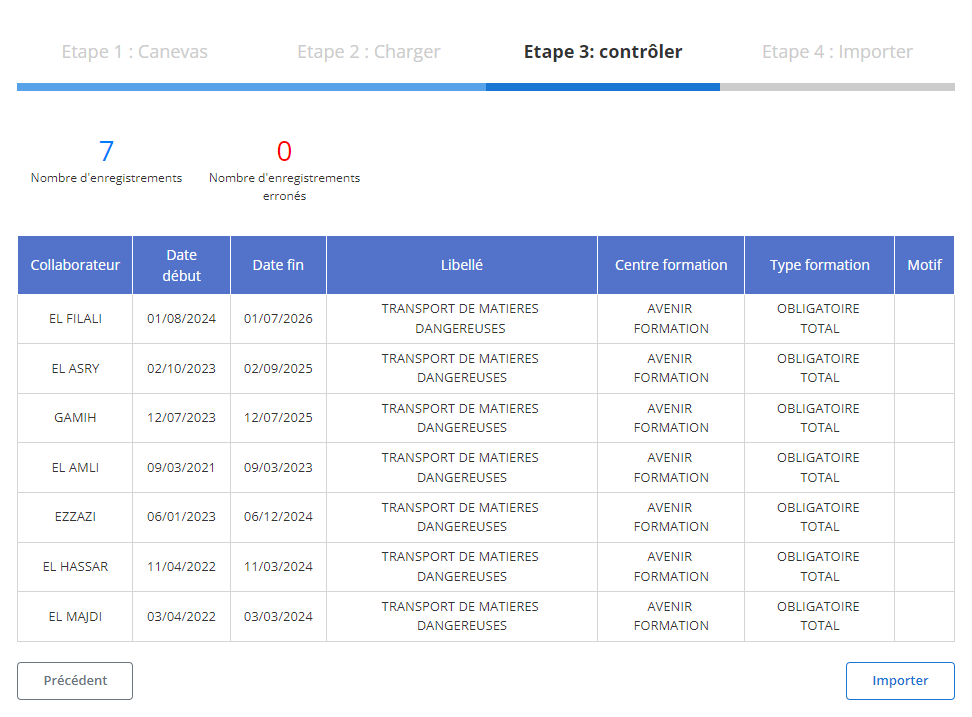
Après le chargement du fichier, un tableau récapitulatif s'affiche avec tous les enregistrements issus du fichier. À cette étape, il est crucial de vérifier que toutes les données sont conformes :
-
Contrôle des erreurs: Le système met en évidence toute erreur potentielle, comme des valeurs manquantes dans les champs obligatoires ou des formats incorrects. Par exemple, si un collaborateur ou une date est manquant(e), cela sera signalé.
-
Vérification des enregistrements corrects: Les lignes sans erreurs seront mises en évidence comme étant prêtes pour l'importation finale. Vous pouvez examiner chaque ligne pour vous assurer de la conformité des informations, comme le nom du collaborateur, la date de début, la date de fin, le libellé, le centre de formation, et le type de formation.
Étape 4 : Finaliser l'importation des formations
Une fois que les données ont été vérifiées et corrigées, vous pouvez procéder à l'importation définitive des formations dans le système.
-
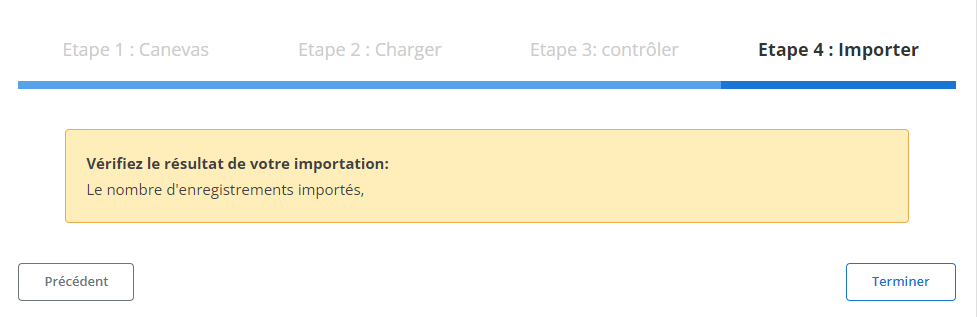
Finalisez l'importation: Cliquez sur le bouton "Importer" pour valider l'importation et ajouter les formations dans la base de données.
-
Confirmation d'importation: Un message de confirmation apparaîtra pour indiquer que l'importation a été réalisée avec succès, et que toutes les formations ont été ajoutées correctement.
Ce processus structuré d'importation de formations permet aux responsables des ressources humaines ou des formations de gagner du temps et de réduire les risques d'erreurs lors de l'ajout en masse de formations. Grâce à cette méthode, les informations sont intégrées de manière précise et cohérente, garantissant ainsi un suivi efficace et une gestion fluide des programmes de développement professionnel au sein de l'entreprise.