

Module · HR
Liste Formations
Liste Formations
Cette section fournit une vue d'ensemble exhaustive des formations proposées au sein du système, offrant aux utilisateurs un accès direct à une liste bien structurée et détaillée. Chaque formation est accompagnée d’une description complète qui inclut ses objectifs, ses prérequis, sa durée et son coût, permettant ainsi de bien comprendre les contenus et les exigences de chaque programme.
L’affichage clair et organisé des formations permet aux utilisateurs de comparer facilement les différentes options disponibles. Cette présentation aide à identifier rapidement celle qui correspond le mieux à leurs besoins et à leurs attentes, qu’il s’agisse d’acquérir de nouvelles compétences ou de perfectionner celles déjà en place. De plus, avec une telle transparence d’informations, il devient plus simple de prendre des décisions éclairées, optimisant ainsi le parcours de développement professionnel de chaque individu. Cette vue d’ensemble est un outil précieux pour ceux qui souhaitent investir dans des formations pertinentes et adaptées à leurs objectifs personnels ou professionnels.
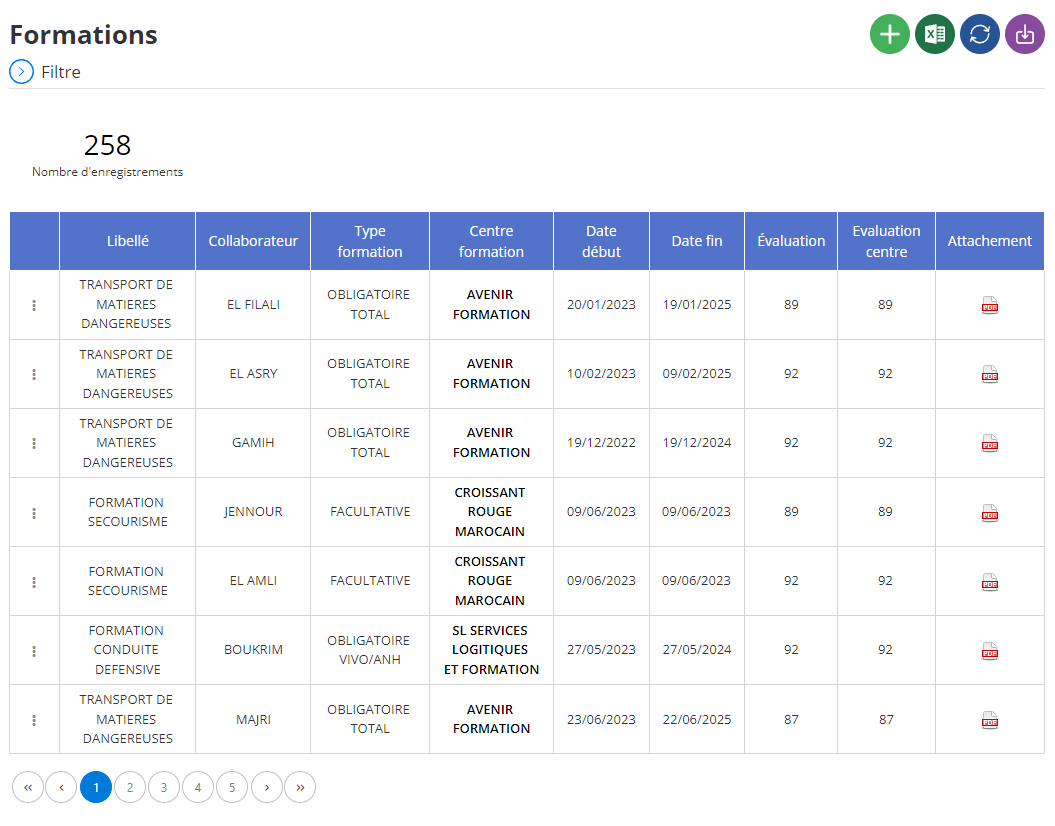
Affichage des formations en liste
Dans la section centrale de l'interface, les formations sont affichées sous forme de tableau, où chaque ligne représente une formation spécifique et chaque colonne fournit des informations clés pour une gestion optimisée. Voici un aperçu des éléments présentés dans cette liste :
-
Libellé: Il s'agit du nom ou de la désignation de la formation, offrant une identification rapide et claire de chaque programme. Ce champ permet aux utilisateurs de repérer facilement la formation qu’ils recherchent ou qu’ils souhaitent évaluer.
-
Collaborateur: Cette colonne affiche le nom de l’employé qui a suivi la formation. Cela permet aux gestionnaires de suivre l’évolution des compétences au sein de l’équipe et d’analyser les formations effectuées par chaque individu.
-
Type de Formation: Le type de formation est spécifié ici, par exemple "Formation en leadership" ou "Formation technique", ce qui aide à distinguer les différentes catégories de programmes offerts. Cela permet de mieux orienter les choix en fonction des besoins de l’employé et de l’entreprise.
-
Centre de Formation: Cette colonne indique le nom de l’établissement ou du centre où la formation a été dispensée. Elle est essentielle pour suivre les partenariats avec les différents centres de formation et pour évaluer la qualité des programmes proposés par chaque centre.
-
Date de Début: La date à laquelle la formation a commencé est indiquée ici. Elle permet de situer chronologiquement les différentes sessions de formation, et d’établir une gestion précise des périodes de développement des compétences.
-
Date de Fin: Cette colonne renseigne la date de fin de la formation, permettant de suivre la durée de chaque programme et d’avoir une vue d’ensemble sur la planification des formations.
-
Évaluation: Cette information présente l'évaluation donnée à la formation par les participants, ce qui permet de mesurer l'impact et la satisfaction des employés concernant le contenu et la qualité de la formation. Elle peut inclure des notes ou des commentaires supplémentaires.
-
Évaluation du Centre: Ce champ donne l’évaluation du centre de formation, permettant de suivre la performance des prestataires externes et d'assurer que les formations répondent aux standards de qualité de l'entreprise.
-
Attachement: Cette colonne permet d’ajouter des documents associés à la formation, tels que des certificats, des rapports de progrès ou des supports de cours. Cette fonctionnalité facilite la centralisation de tous les documents pertinents et permet un accès rapide aux informations essentielles.
Cette présentation sous forme de tableau offre une vision complète et bien structurée des formations, permettant aux gestionnaires de suivre de manière détaillée l’évolution des compétences des collaborateurs. Grâce à une gestion fluide et claire des formations suivies, il devient possible de prendre des décisions éclairées, de planifier les formations futures et d’assurer une conformité avec les objectifs de développement de l’entreprise.